Free online DWG viewer
View DWG files online. Free, and nothing gets uploaded.
Caddis is a free online DWG viewer that reads the drawing inside your browser tab. Open an AutoCAD DWG, zoom around the plan, switch layers on and off, measure distances and add markup, without installing CAD software, creating an account or sending the file to a server.
No account required for local viewing. Files stay on your device unless you opt into Cloud.What is a DWG file?
DWG is AutoCAD's native drawing format, used for architectural plans, site layouts, mechanical drawings and most other 2D technical drawings. Opening one normally takes AutoCAD or another CAD program; a viewer like Caddis lets you read and check the drawing without one.
How to view a DWG file online
- 01Open the viewer. Go to the Caddis web viewer. It runs in current Chrome, Edge, Firefox and Safari (18.2 or newer), on Windows, Mac, Linux, Chromebook and Android.
- 02Choose your drawing. Pick the .dwg file from your computer or phone. The Caddis engine reads it right in the tab, so even large drawings don't wait on an upload.
- 03Find your way around. Scroll or pinch to zoom, drag to pan, and double-click to fit the whole drawing. Open the layer list to hide clutter such as furniture, dimensions or hatching and focus on what you're checking.
- 04Measure and mark up. Measure distances between points on the drawing and add review markup. Your notes are kept apart from the DWG, so the original file is never changed.
Which DWG versions can you open?
A DWG's version depends on the AutoCAD release that saved it, not the year it was drawn. Caddis has been verified against every DWG format from Release 14 to the current 2018 format, which AutoCAD still uses today.
| Saved by | Format code | Opens in Caddis |
|---|---|---|
| AutoCAD 2018 and later | AC1032 | Yes |
| AutoCAD 2013–2017 | AC1027 | Yes |
| AutoCAD 2010–2012 | AC1024 | Yes |
| AutoCAD 2007–2009 | AC1021 | Partly: some entities and colors may be missing |
| AutoCAD 2004–2006 | AC1018 | Yes |
| AutoCAD 2000–2002 | AC1015 | Yes |
| AutoCAD Release 14 | AC1014 | Yes |
| AutoCAD Release 13 | AC1012 | Not yet verified |
| Release 12 and older | AC1009 and earlier | No |
Not sure which version you have? The free DWG version checker reads it from the file in a second, also without uploading it.
Why use a DWG viewer that doesn't upload your file?
Most online DWG viewers send your drawing to their servers to convert it before you can see it. That means waiting for the upload, often signing up first, and handing a client's plans to a third party.
Caddis works differently: the DWG reader is compiled to WebAssembly and runs in your browser, so the file is read on your own computer or phone. Nothing is sent anywhere unless you choose to save a project to Caddis Cloud.
- Private by default. Drawings under NDA or for unreleased projects stay on your device.
- No account. Open the viewer and choose a file; there's no sign-up form in the way.
- Free. Viewing, layers, measuring and markup cost nothing.
Good to know before you open a drawing
- Model space is shown. Geometry that only exists in a paper-space layout won't appear. If a drawing looks empty, see why a DWG opens blank.
- External references aren't loaded. If the drawing relies on xrefs for backgrounds or title blocks, ask the sender for a bound copy or an eTransmit package.
- Text is drawn in built-in CAD-style lettering, so it may look slightly different from the original typeface.
- It's a viewer, not an editor. To change the drawing you still need CAD software. To hand it to someone who can't open DWG, convert it to PDF or to DXF for free.
Other ways to open a DWG
| Option | Where it runs | Account or upload? |
|---|---|---|
| Caddis web viewer | Any modern browser | Neither |
| Caddis for iPhone and iPad | iOS app, opens files from the Files app | Neither |
| Autodesk DWG TrueView | Windows desktop download | No account |
| Autodesk Viewer | Browser | Autodesk sign-in; file is uploaded |
| AutoCAD | Windows, Mac, web | Paid subscription |
On a Mac, see how to open DWG files on a Mac. For a deeper look at the format itself, read what a DWG file is and how DWG differs from DXF.
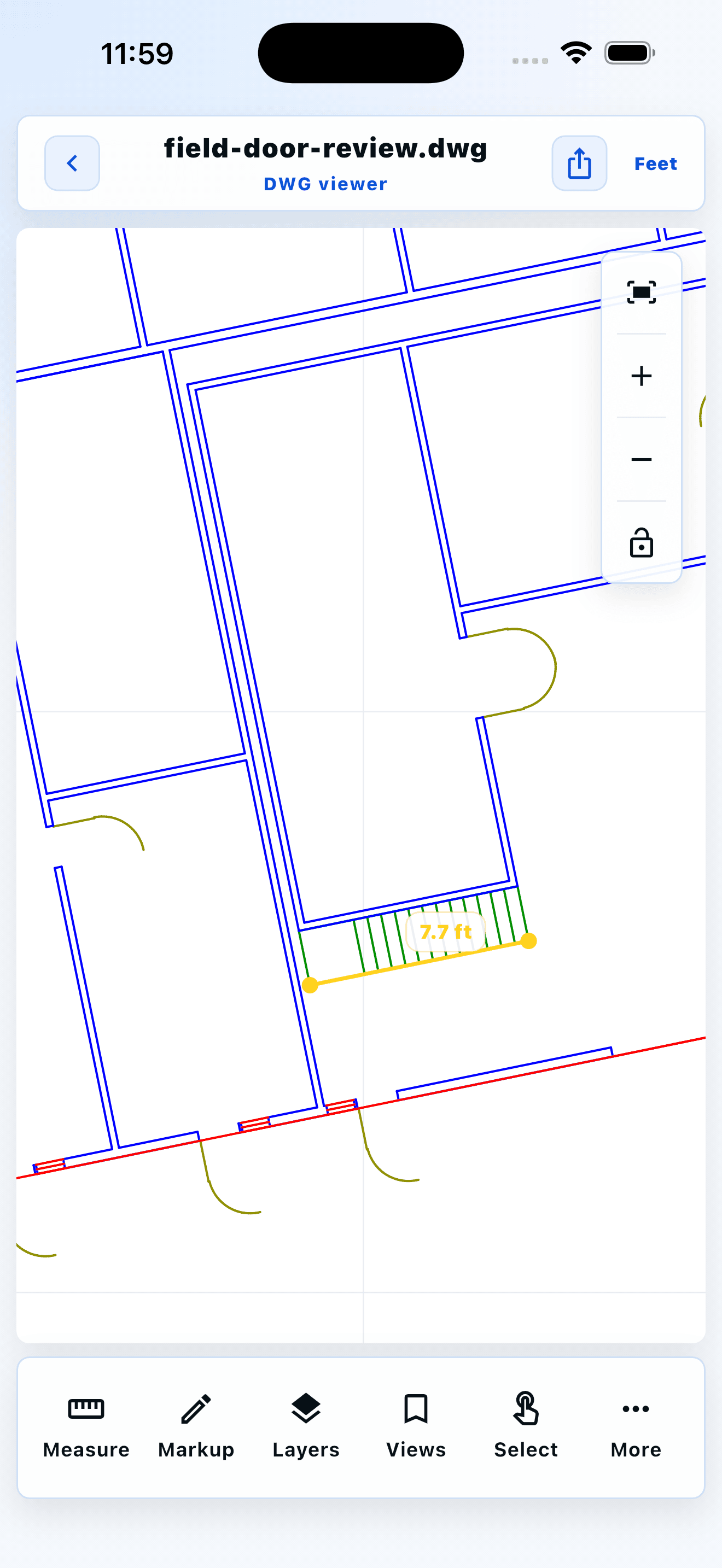 Measure a stair run on site
Field-review workflow
From drawing to clear feedback.
- 01Open the Caddis web viewer.
- 02Choose a DWG file from your device.
- 03Zoom, toggle layers, measure and mark up, all in the browser.
Built for practical review
Your drawings stay under your control
Caddis is local-first: opening a supported file for local review does not require uploading it. If you choose Caddis Cloud, you can continue a project across devices or create a revocable, read-only link.
Frequently asked questions
Is this online DWG viewer really free?
Yes. Opening, viewing, toggling layers, measuring and marking up DWG files in the Caddis web viewer is free and doesn't need an account. An account is only needed for optional cloud features.
Can I view a DWG file online without uploading it?
Yes. Caddis reads the DWG inside your browser using WebAssembly, so the file stays on your device. It is only uploaded if you choose to save the project to Caddis Cloud.
Which AutoCAD versions does the viewer support?
DWG files saved by AutoCAD Release 14 through AutoCAD 2018 and later open fully. AutoCAD 2007–2009 files open partially, Release 13 files are untested, and Release 12 and older DWG files are not supported.
Can I edit a DWG file online with Caddis?
No. Caddis is a viewer and review tool: you can measure and add markup, but the drawing itself isn't edited. Your markup is stored separately from the DWG.
Why does my DWG look blank or incomplete?
The geometry may be in a paper-space layout, on frozen layers, in missing external references, or the file may be from a partly supported version such as AutoCAD 2007. The guide 'Why won't my DWG file open?' walks through each cause.
Do I need an account to use Caddis?
No. You can open and review supported files locally without creating an account. An account is only needed for optional cloud features.
Are my CAD files uploaded?
Not for local viewing. Caddis processes supported files on your device. Cloud storage and share links are opt-in per project.
Can I use Caddis offline?
Local review is designed to work on your device. Cloud sync and share links naturally require an internet connection.
Which CAD formats can Caddis open?
Caddis opens supported geometry from DWG, ASCII DXF, STL, OBJ, PLY, STEP/STP, and IFC files. DWG, STEP/STP, and IFC compatibility is limited by source version and geometry type; unsupported geometry is reported rather than silently replaced.
Explore Caddis tools
DWG viewerDXF viewerSTEP viewerSTL viewerOpen DWG without AutoCADDWG viewer for contractorsCAD markup in the fieldFree CAD converterDWG version checkerWhy won't my DWG open?Open DWG on a Mac